

Fonvira: What It Is, How It Works, and Why Designers Use It
A closer look at Fonvira, the free online color picker that helps designers, developers, and website owners work with HEX, RGB, and HSL color codes.

Introduction
Choosing a color looks easy. Getting the exact shade into a website, logo, or digital project can be another story.
That’s where Fonvira comes in.
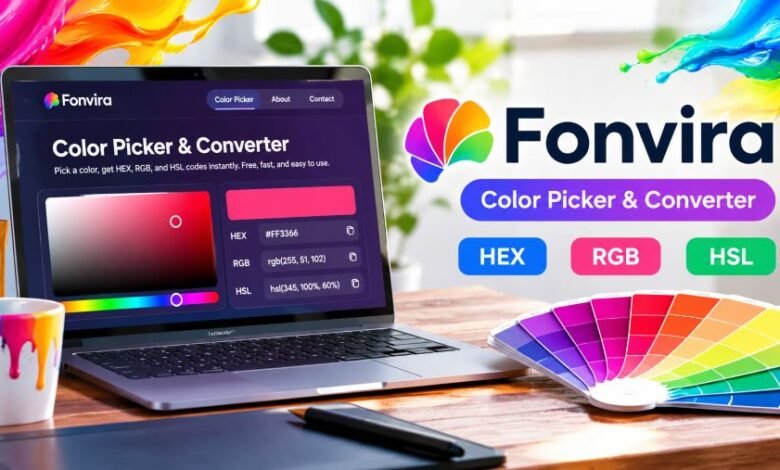
Fonvira is a free browser-based color picker and converter. It helps users select colors, see their digital values, and copy those codes for use in their projects.
No complicated setup. No software installation.
The website focuses on three popular color formats: HEX, RGB, and HSL. Whether someone is editing a website theme or adjusting a brand’s colors, the tool offers a convenient way to find the values they need.
Quick Facts About Fonvira
| Detail | Information |
|---|---|
| Name | Fonvira |
| Website | fonvira.com |
| Type | Online color picker and converter |
| Main Function | Color selection and code conversion |
| Supported Formats | HEX, RGB, HSL |
| Cost | Free |
| Registration | Not required |
| Installation | Not required |
| Devices | Desktop and mobile browsers |
| Processing | Browser-based |
| Primary Users | Designers, developers, and content creators |
| Founder | Not publicly identified |
What Is Fonvira?
Fonvira is an online utility that helps people work with digital color codes.
Every color displayed on a website has a technical value. A bright blue heading, a pink button, or a dark gray background can all be represented using numerical codes.
For someone unfamiliar with those codes, selecting the right shade can become frustrating.
Fonvira makes the process easier.
Users can choose a color or enter a HEX code. The website then displays the corresponding RGB and HSL values, along with a visual preview.
These values can be copied and used in compatible design applications or website code.
Unlike a full graphic design program, the platform does not attempt to handle every creative task. Its main purpose is color selection and conversion.
That makes it suitable for small, focused jobs.
How Does Fonvira Work?
The process is straightforward. Users don’t need technical experience to get started.
Step 1: Open the Website
Visit the official Fonvira website through a compatible browser.
The color picker is available directly on the page, without requiring visitors to create an account.
Step 2: Choose a Color
Select a shade using the color picker or enter an existing HEX value.
This can be useful when working with a brand color that already has an assigned code.
Step 3: View the Color Values
The website displays the matching RGB and HSL values.
A live color preview helps users see the selected shade before applying it to a project.
Step 4: Copy the Code
Use the copy control to take the required color value.
The code can then be pasted into a website stylesheet, compatible design editor, or other application that accepts the format.
The main advantage is convenience. Users can move from color selection to practical implementation without manually calculating conversions.
Understanding HEX, RGB, and HSL Colors
These three formats describe digital colors in different ways.
Knowing their differences makes it easier to choose the right value for a project.
HEX Color Codes
HEX codes use hexadecimal notation to represent colors.
A common example is #2563EB, which represents a shade of blue.
HEX is widely used in website styling, brand guidelines, and graphic design software.
Website owners often prefer HEX values because they are short and easy to save.
RGB Color Codes
RGB stands for Red, Green, and Blue.
It represents a color through the intensity of these three components.
For example:
rgb(37, 99, 235)
This RGB value represents the same blue shade as #2563EB.
RGB values are useful in CSS, JavaScript, graphics programming, and other digital applications.
HSL Color Codes
HSL stands for Hue, Saturation, and Lightness.
Hue describes the general color family, saturation controls its intensity, and lightness determines how light or dark it appears.
HSL can be especially helpful when someone wants to adjust a shade while keeping its general character.
For example, changing the lightness can create a lighter button background or a darker hover effect.
Main Features of Fonvira
Live Color Preview
The website shows the selected color visually.
This allows users to check how a shade appears before copying its value.
A preview can help reduce mistakes when choosing between similar colors.
Instant Color Conversion
Users can view corresponding color values without performing calculations.
This saves time when switching between HEX, RGB, and HSL.
Simple Copy Controls
The tool provides copy buttons for its displayed color values.
Instead of manually selecting and rewriting numbers, users can transfer the codes into their work.
Free Browser Access
According to its published terms, Fonvira is free for personal and commercial use.
There is no mandatory registration or software download for its main functionality.
Desktop and Mobile Compatibility
The service is designed for use in desktop and mobile browsers.
That makes it convenient for someone who needs to check a color code while working away from their usual computer.
Who Can Benefit From Fonvira?
The tool has several practical uses.
Web designers: They can choose heading, button, background, and accent colors while creating website layouts.
Front-end developers: Developers can copy color values into CSS or other supported code formats.
Graphic designers: A color conversion tool can help maintain consistent colors when moving between compatible applications.
Website owners: People managing WordPress themes or website builders can use color codes when changing their site’s appearance.
Students and beginners: Anyone learning digital design can use the picker to understand how numerical color values correspond to visible shades.
Using Fonvira for Website Branding
A consistent color scheme helps a website feel organized.
Imagine a small business using a particular shade of blue throughout its website.
That shade appears in its logo, navigation menu, buttons, and promotional graphics.
If every section uses a slightly different blue, the design may look inconsistent.
A practical solution is to maintain a short list of approved brand colors.
For example:
- Primary color:
#2563EB - Dark text:
#111827 - Light background:
#F9FAFB - White:
#FFFFFF
These are illustrative color choices, not an official Fonvira palette.
A color picker can help users check and convert those values. Keeping a separate brand style guide makes the colors easier to reuse across projects.
Does Fonvira Check Color Accessibility?
Choosing a color is only part of good web design.
A page must also be readable.
Pale text on a white background might look attractive in a design preview, but it can be difficult to read on a mobile screen.
Under WCAG 2.2 Level AA, normal text generally needs a contrast ratio of at least 4.5:1, while qualifying large text needs at least 3:1.
Fonvira offers color selection and conversion. Its advertised features do not establish that it includes a dedicated accessibility contrast checker.
For that reason, designers should use a separate contrast-testing tool before publishing important website elements.
A visually appealing shade is not automatically an accessible one.
Is Fonvira Free to Use?
Yes.
The website’s published Terms of Service state that the tool is available without charge for personal and commercial use.
Users can work with the generated color values without purchasing a subscription.
The terms also state that the output produced from user input belongs to the user.
However, the service is provided without guarantees of uninterrupted availability or error-free results.
Anyone using the tool for an important project should verify the final colors in the destination application.
Is Fonvira Safe and Private?
Privacy is another consideration when using browser-based utilities.
According to Fonvira’s privacy policy, color selection and conversion happen locally in the user’s browser.
The website states that these color values are not sent to or stored on its servers.
It also says users do not need to provide personal information to access the tool.
There are some important distinctions, though.
The policy discloses the use of Google Fonts, possible hosting and security-related logs, and an external service for processing contact-form messages.
Therefore, browser-based color processing should not be confused with a website that makes no network requests.
These descriptions reflect the operator’s published privacy policy, not an independent security assessment.
What Are the Limitations of Fonvira?
The service is designed around a narrow task.
That simplicity is useful, but it also means the tool should not be mistaken for complete design software.
Its publicly described features do not establish support for advanced capabilities such as automatic image color extraction, collaborative design libraries, professional print color management, or full accessibility testing.
Someone creating a detailed brand identity or working with print production may need additional applications.
For everyday color selection, however, a lightweight tool may be enough.
Fonvira vs Professional Design Software
A full design application can offer image editing, illustrations, multiple artboards, export settings, and team collaboration.
Fonvira takes a different approach.
It focuses on finding a color and retrieving usable values.
That distinction matters.
Someone designing an entire website interface will still need development or design software. Someone simply trying to convert a HEX value may not need to open a large application.
The right choice depends on the work involved.
What Is Known About Fonvira’s Background?
The official About page describes Fonvira as a free utility built to make color conversion quicker and easier.
It also states that the tool is maintained and improved using feedback.
However, the public information reviewed does not identify a founder, legal company name, headquarters, or exact launch date.
These details should not be assumed.
The website’s copyright notice references 2026, but that alone does not confirm when the service was originally launched.
Final Thought
Fonvira addresses a small but familiar problem in digital design: finding a color and getting the correct code.
Its main appeal comes from simplicity.
Users can choose a shade, view different representations, and copy the values without creating an account or installing software.
It is not a replacement for professional design applications, and important projects still require separate accessibility and visual checks.
For designers, developers, students, and website owners who regularly work with color codes, it offers a practical option for everyday tasks.
Frequently Asked Questions (FAQs)
1. What is Fonvira?
Fonvira is a free online color picker and converter that displays HEX, RGB, and HSL values for selected colors.
2. What is Fonvira used for?
It is used to select digital colors, convert their values, and copy those codes for website design, development, and other creative work.
3. Is Fonvira free?
Yes. Its published terms describe the service as free for personal and commercial use.
4. Do I need to register to use Fonvira?
No. Registration is not required to use its main color picker and conversion functions.
5. Does Fonvira work on mobile phones?
The official website states that its browser-based utility works on desktop and mobile devices.
6. What color formats does Fonvira support?
Its advertised formats are HEX, RGB, and HSL.
7. Does Fonvira store my selected colors?
According to its privacy policy, the color values generated through the tool remain in the user’s browser rather than being stored on its servers.
8. Can Fonvira replace Photoshop or other design software?
No. It is primarily a color selection and conversion utility, not a complete photo editor or graphic design application.